
06:40
“Where am I going today?”
The plan changed last night in the group chat. In the morning the phone rings, then again and again — before anyone has started work.
For service businessesSchedule · Jobs · Working time
Crewilo brings your schedule, jobs and working time together in one app. Your team has the day’s plan on their phones, and you no longer piece the hours together from memory in the evening.

For teams of 2–50 people who work at the customer’s site:
Sound familiar?
06:40
The plan changed last night in the group chat. In the morning the phone rings, then again and again — before anyone has started work.
11:15
A customer asks about the work. The photos are on an employee’s phone, and that employee is already on another job across town.
21:00
Instead of resting, you copy hours from messages to send invoices and run payroll — and wonder whether anything slipped through.
With Crewilo, your team knows what to do. You know where things stand.
Who it’s for
In a small business, one person is often the owner, the planner and the specialist at once. Crewilo makes each of those roles easier.
You run the business
You can see what was done, how long it took and what you can bill. Your evenings are yours again.
You plan the schedule
Move a job and the team sees the new plan in their app. You spot a clash with leave before a job is left without anyone.
You work in the field
The day’s plan, directions and checklist are on your phone. Your hours are recorded with the job — accurately, to the minute.
PolskiNorskEnglishУкраїнська
How it works
The office plans, the team does the work, and information from the field comes back on its own — no retyping.
Morning
You assign people to jobs with the time, address and scope. Plan recurring visits once and Crewilo repeats them for you.
During the day
Employees open the job, get directions to the address and start work with one tap. Less searching, more attention for the work itself.
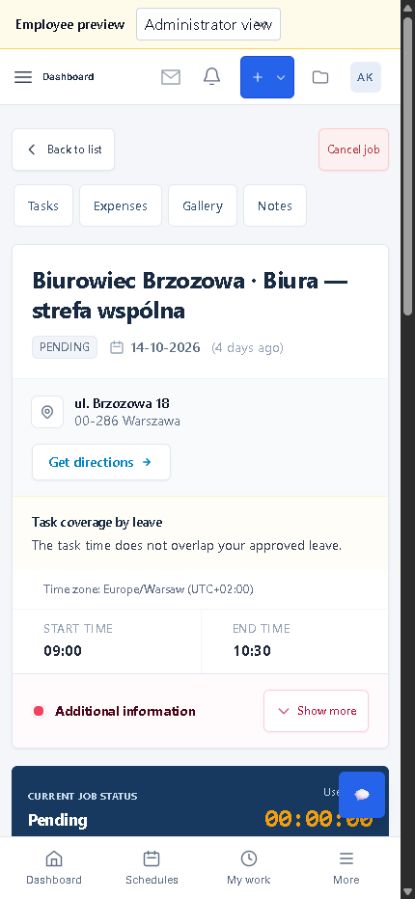
After work
See what was done and when. Recorded hours and the job history help you prepare billing without piecing the day together from memory.
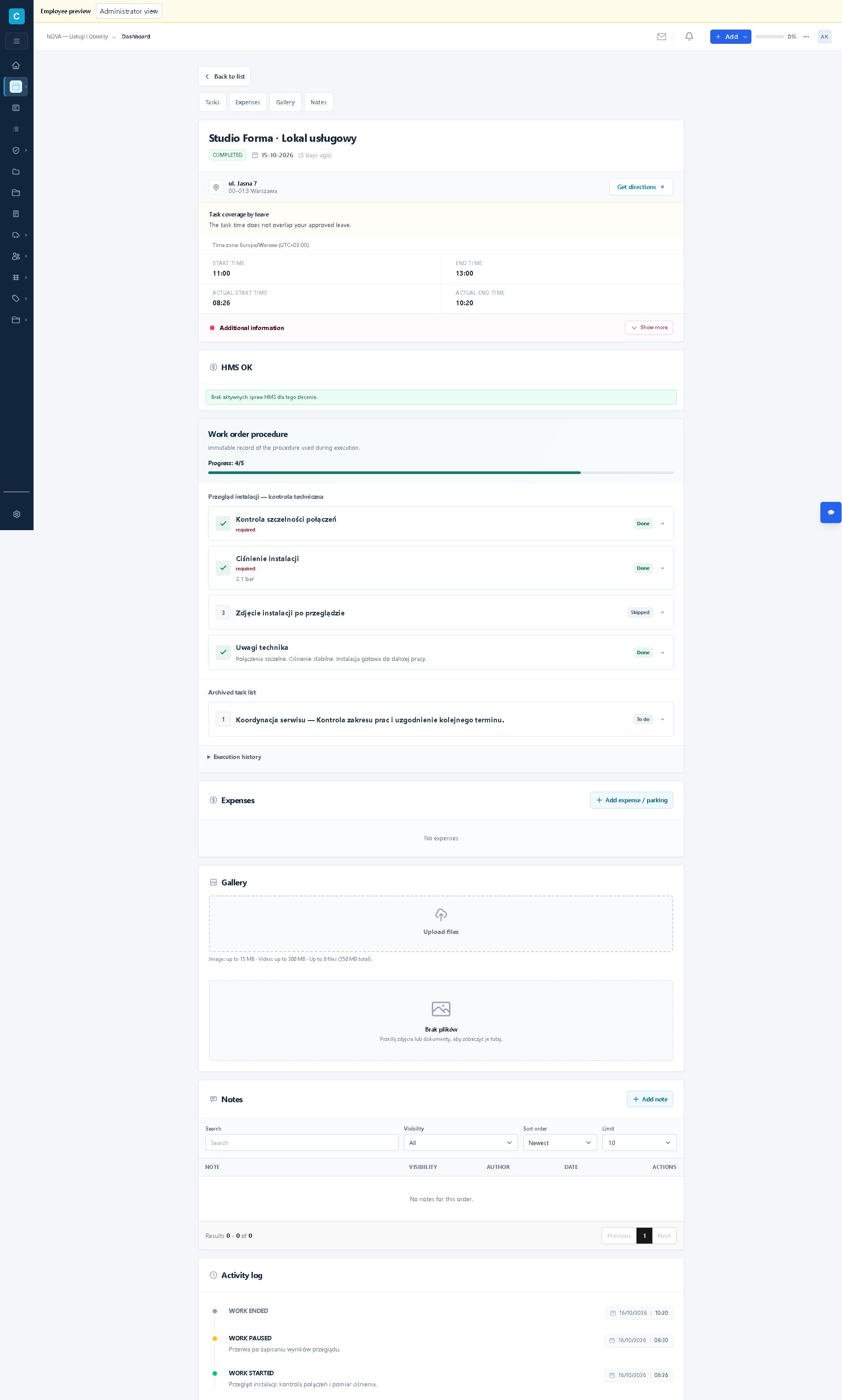
Features
Start with the schedule and jobs. Add the rest when you need it.
Week, hours, bookings and list views. Print the plan for the crew.
Scope, stages, responsibilities, budget and project time.
Start, break and finish. Planned next to actual hours.
Required steps, readings and technician’s notes on the job.
HMS actions and documentation linked to everyday work.
Gallery, drive and files, always with the right job.
Costs, parking and travel ready to review.
Requests visible next to planning, with a clash warning.
Addresses, sites and agreements without digging through messages.
Check-outs and returns with the person, date and quantity.
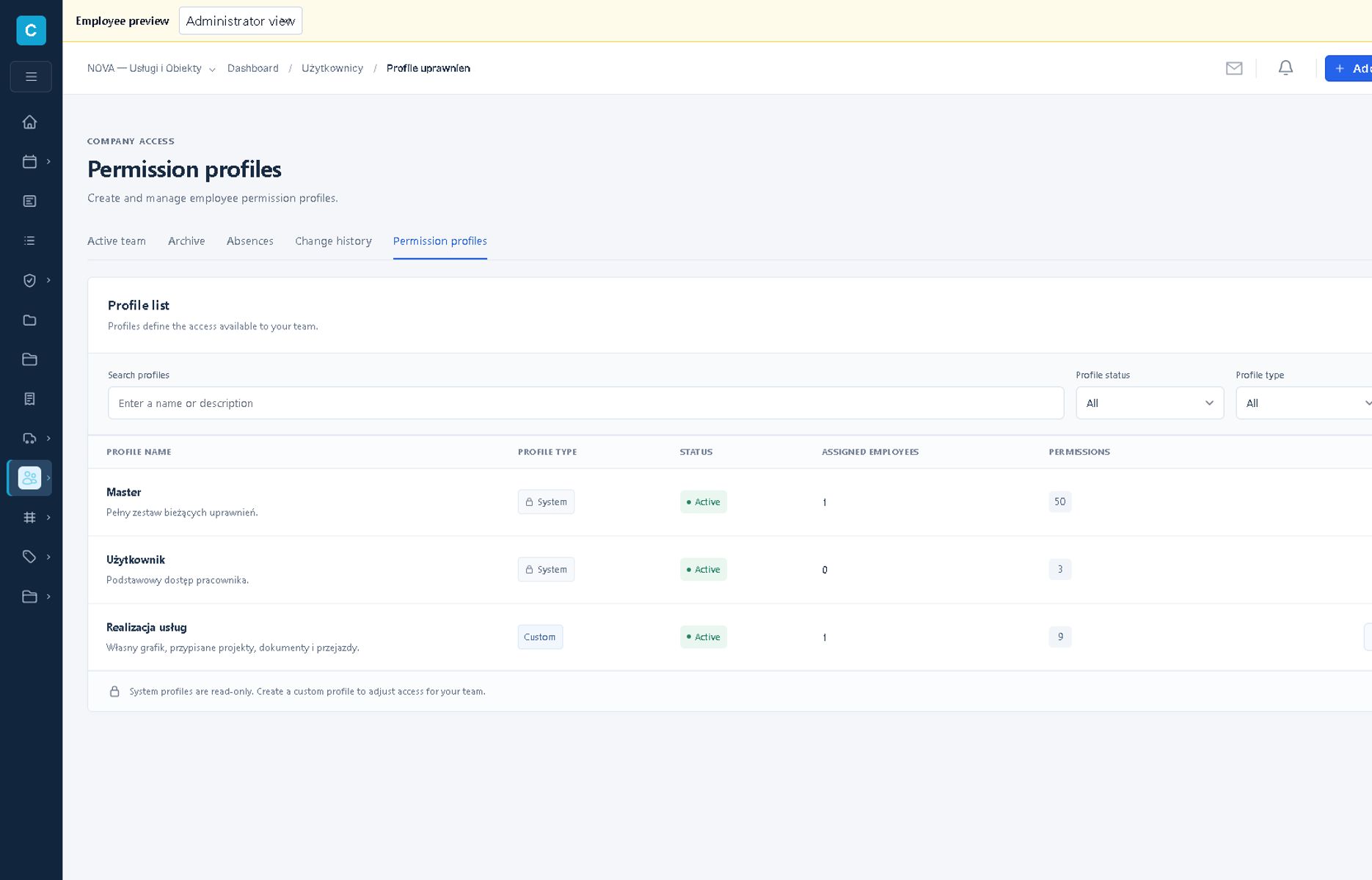
Everyone sees what they are responsible for — and nothing more.
Important changes reach the right people.
One price per account — all core features come with it.
See pricingQR codes and NFC stickers
Hold your phone near an NFC sticker or scan a QR code. Crewilo identifies the location or equipment, and the employee confirms the right action.
Assign a tag to a location and use it to confirm the start of work. The time record stays with the right job, in line with your company’s rules.
Scan the tag, open the equipment record and log a checkout or return. The history shows who, when and how many, making it easier to see who is using the equipment.
Reading NFC tags requires a compatible phone and the Crewilo app.
Crewilo in your industry
Regular visits, one-off jobs and projects divided into stages. Choose the way of working that best fits your team.
Offices on Monday, Wednesday and Friday. Assign people to sites, set the hours and share the checklist. After each visit, review the recorded time and documentation.
Technicians check the job scope, confirm completed steps and record measurements. At the next visit, you can refer back to the results and notes.
Divide the work into stages and assign responsibility. Keep hours, travel, expenses and files with the project they belong to.
The address, site areas and access instructions are stored with the client’s location. Link the site to regular visits and tasks, even when a different person takes over.
Combine regular maintenance with one-off jobs. Assign a crew to a site, record their working time and attach photos when the work is done.
Break the event into stages and assign responsibility. Keep the team’s hours, expenses and files together under one job.
Help getting started
You can set up Crewilo on your own. If you prefer, we’ll go through the start together.
No payment card needed. The free accounts stay in your plan for good.
Add a customer, a location and your first job. You can start from sample data.
Employees sign in on the phone app or in a web browser — in their own language.
Security and data
Everyone on the team sees only what they are responsible for. Data from different companies is kept separate, and you decide who has access.
Data is stored in an Oracle Cloud data centre in the European Union.
A backup of the data is made every day.
Your data belongs to you — you can export it.
Roles and permissions are checked within the company context where the work belongs.
Queries and actions retain company scope so data from different workspaces does not mix in normal application flow.
Sign-in, credentials, and sessions use controls that limit improper access.
The access controls described here are confirmed in code and documentation. This is not a guarantee of outcome or an external attestation.
Crewilo for Android and iPhone
Sign in with the same account on your phone. Your schedule and job details are with you, wherever you work.
Pricing
You only pay for accounts beyond the free ones. When someone leaves, deactivate their account and stop paying for it.
To begin: you and your first person in the field.
0USD / month
For a growing team
Each additional account, billed monthly or yearly.
—USD excl. tax / account / month
Include yourself and your whole team. Free accounts included: 2.
Cost for the whole team
—NOK / month
Choose the number of people and the billing period.
The price of each additional account depends on the billing period you choose.
A larger team, several branches or special requirements.
Custom
Send customers quotes online. They accept them in the browser, and you turn an accepted quote into a project with one click.
— USDexcl. tax / month
Prices exclude tax. File space beyond 5 GB is billed according to the payment settings.
Good to know
Don’t see your question? Write to us and we’ll answer with your team in mind.
No. The free accounts and 5 GB for files stay in your plan even as your team grows. You only pay for additional accounts.
No. You create a free account without a payment card.
Yes. You can set up Crewilo yourself, but we are happy to help: we’ll show you how to plan your first week, set permissions and invite your team. Just write to us.
No. Crewilo works in a web browser, and the Android and iPhone apps are optional. Reading NFC tags requires a compatible phone with the Crewilo app.
Polish, Norwegian, English and Ukrainian. Everyone on the team can use the app in their own language.
Yes. Deactivate the accounts you no longer need — you only pay for active accounts beyond the free ones. You can also return to the free plan.
In an Oracle Cloud data centre in Amsterdam, in the European Union. We make backups every day, and you can export your data.
Start with one job and one person. If you like, we’ll help you get going.
Free accounts: 2, for good · No payment card needed